Archive for the ‘Online marketing’ tag
Funny Marketing Idea - Funny Commercial 2
Haven’t seen the first post “Fight for Kisses”? Check it out first!
Here’s more to inspire you to generate more funny marketing ideas.
When it comes to commercials, people often say “sex sells.” Well, I’m not sure how much sex helps boosting sales, but it’s surely being used a lot in commercials especially for beer as the one below.
Funny, unexpected idea / story line plus beautiful woman is really a good combination for a memorable [thus successful] commercial for beer.
Don’t speak the language. It’s ok…
Related post: Funny Marketing Idea - Funny Commercial 1
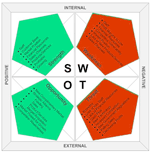
SWOT Analysis For Websites
Already had a SWOT analysis for your overall marketing plan and strategy, have you ever done a SWOT analysis for your website?
We’ve just started the new year, so maybe it’s also time for you to start thinking about renewing or starting a SWOT analysis for your website / online marketing if you haven’t got one yet. The SWOT analysis for your website can be integrated into your overall SWOT analysis; however, it may be better to be separated.
Funny Marketing Idea - Funny Commercial
Planning to use something funny as the theme in your new ads or marketing campaign? Check out the video below.
I saw some crazily funny commercials here and there online and decided to open a couple of posts just for them. After all, fun is a great emotional button to push when you want your ad to stand out, to be remembered and to be talked about. If you’re looking for crazy, funny ideas for your ads, commercial or marketing campaign, hopefully this video and the ones coming up can give you some idea and inspiration. If not, the video is still helpful: it’ll give you a good laugh.
Create HTML Email In Outlook
Step-by-step guide on how to create HTML email in Outlook 2003
Updated for MS Outlook 2007
Already know about the good, the bad, and the ugly of HTML through the post about HTML email overview, let’s start creating an HTML email in Outlook.
Quick notes about Outlook 2003 and Outlook 2007: the process below is the same for both Outlook 2003 and Outlook 2007. The difference between these two versions of Outlook is not in the process of creating and sending HTML email but in the built-in HTML email readers. Thus, there may be a bit difference if you create HTML for Outlook 2003 and Outlook 2007, but there won’t be any difference if you create HTML in or with Outlook 2003 and Outlook 2007.
HTML Email - The Good, The Bad, and The Ugly
Switching to HTML email? Know why people love and hate HTML enabled emails, and what can be done to have a smooth transition.
HTML email as its name implied is an email written or coded with HTML as opposed to a plain text email. There’s one thing that should be clarified before we go on: today, most emails are HTML emails; if you color or bold your text, insert images in your email, more likely you’re sending an HTML email. However, that’s not what is meant by “HTML email” or “HTML enabled email” in this article. So what do we mean by sending an HTML email? Roughly, we mean to send a web page or a well designed and well coded HTML page as an email.